Newsletters tell the sender when you open them and which links you click. Wallflux Clearinghouse strips that out and sends the message back to you, clean.
Try it in 30 seconds Forward any newsletter to clearinghouse@wallflux.com. You get a clean copy back within the hour. No account, no app.
Or paste the text or HTML into the web form and see the result straight away.
Below is a real newsletter, before and after: the original with tracking, and the same message cleaned. The links now go straight to their destination.
This e-mail was sent by the Rathenau Institute, a Dutch institute which advices on science, technology and society.
You can try Wallflux Clearinghouse yourself by pasting tracked e-mail into the #webservice.

Read about email privacy in the New York Times of November 22, 2000
Note! By sending/forwarding e-mail to Wallflux Clearinghouse you agree to receive e-mail from Wallflux Clearinghouse.
The easiest is to forward mail with tracklinks directly when it arrives in your mailbox. This way, by the time you'll read your mail, all tracklinks are already removed. To achieve this, you must be able to use advanced filtering on your mailserver.
Here we share with you how to forward tracked mail to Wallflux Clearinghouse for a few different email providers. Please share with us if you know of a method/service still missing!

Wallflux has developed a GoogleApp-script for forwarding tracked e-mail from MailChimp, MyClang and Create Send to Wallflux Clearinghouse.
For tech-oriented users, the script can be adjusted to catch other e-mail tracking providers.
For the script to work, you need to give GooglApp permission to access your Gmailbox. Also, you need to set up a 'trigger' which runs the filter hourly. In order to do so, you can follow the instruction which are included at the beginning of the script.
For improved security, you can also download the script and upload it to your own google drive'. After you verify & trust the workings of the script (and it isn't very complicated!) connect it to your Gmailbox. This way Wallflux doesn't need access to your Gmailbox.
While you're at it, you should disable automatic loading of images as "In some cases, senders may be able to know whether an individual has opened a message with unique image links". If you're not turning of images, and you're not proxying requests to "http://gallery.mailchimp.com" you will still be tracked.
Learn how to choose whether to show images here.
One final remark on Google; you might sometime receive an error email like this one. It seems you can safely ignore it, but don't hesitate to contact Wallflux if you have reason to believe otherwise.

Thunderbird can only provide client side filtering:
Create a new filter in Tools > Message Filters.

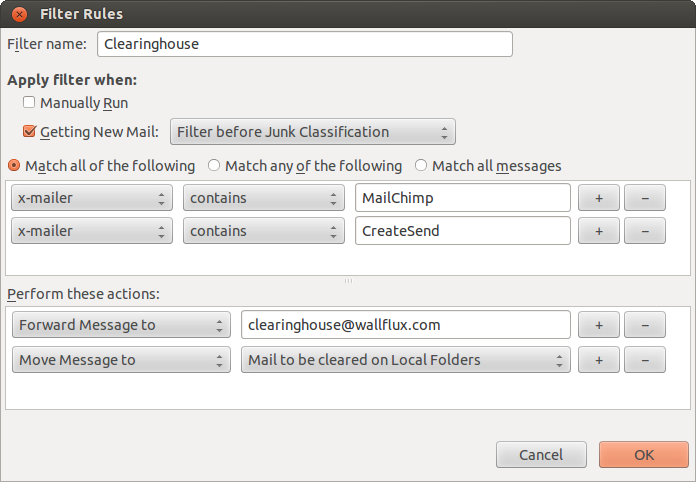
In the filter settings choose on which fields to filter. By default, Thunderbird doesn't have the x-mailer-field, but its easy to add using the Customize....
Then filter on for example MailChimp and CreateSend, have the messages automatically forwarded to clearinghouse@wallflux.com, and move it away from your Inbox into a dedicated folder.

Please share your tips!

Advanced filtering seems not possible.

We haven't investigated yet.

Please share your tips! (Does anybody still use Pegasus?)

There is an advanced filtering method available, called Sieve. Personally, we haven't got experience with Sieve (you're supposed to have access to a Sieve-compliant mail server). Any tips are welcome!
Click tracking is about links which suggest to lead to one Internet-address, but first lead you past another, in order to track your visit. For example; the link above suggests to go to Twitter, but in fact it links to http://Rathenau.m13.mailplus.nl/ctt13686943/12345. Although such a link in email sent to you immediately redirects to the target Twitter-address, your brief visit to the specially crafted mailplus.nl-address allows the sender of the email to register that you clicked the link in their email.
These links are tracking enabled links. By serving you emails with such links, a sender is able to monitor which links you visit. The mailinglist-provider collects information about your interests. And as they (obviously) already have your email address, it is affecting your privacy on the web.
Almost every email in marketing campaigns contains click tracking; Each click on a link in such mail is tracked. By tracking, marketeers build a rich profile of your interests. This is valuable information for marketing purposes; mostly for trying to sell you stuff, but government-run organisations also harvest user-profiles.
So who does this? You might have heard of Mailchimp; This company provides affordable email marketing tools. According to Wikipedia Mailchimp sends billions of emails each month, with probably tens of billions of tracklinks. Many companies such as CreateSend, Deployteq, Spotler, CivicCRM, ..., provide email-marketing and linktracking services. MailChimp's privacy policy doesnt mention what it does with the data it collects, but offers its paid customers to disable it. A new kid on the privacy invaders block is the e-mail app Superhuman, who calls its privacy invading tracking pixel pings “Read Receipts”.
You can recognize link tracking by the long lists of apparently random character and the unfamiliar domain name, such as http://placeholder.cmail3.com/t/d-l-fcjkd-xirwtkj-o/. In this example, cmail3.com is the domain of the linktracker, and the apparently random characters aren't random; they identify you and your email. The tracker knows which links were sent to you, and where they're supposed to send you next.
Examine tracklinks using wheregoes.com
Do note that clicktracking doesn't only happens in email. It also happens on the web. Twitter, for example, alters every tweeted link into a short t.co-address which is ofcourse tracked by Twitter. When you are lead past t.co, Twitter knows whose tweet it was being clicked. The only information still missing is your email-address. Tweet tweet...
For a regular user it is often not easy avoid being tracked; In order to find out where a link leads, you need to follow the link, but as soon as you click it, the sender will know you did so, and stores your interest in their CRM database.
Obviously, there are privacy concerns at play; At Wallflux we like to keep our interests private. Whether or not we open a mail, or we check a link in a mail sent to us, is no-ones' business but our own. We understand the interest of marketeers, but this interest is not shared.
Forward email with tracklinks to clearinghouse@wallflux.com. You get an immediate reply with click tracking removed!
You can have emails automatically cleared of click tracking by setting up a filter which automatically forwards messages with click tracking to clearinghouse@wallflux.com. You could automatically forward all emails which have the header x-mailer: Create Send or x-mailer: MailChimp to the clearinghouse-address.
We've published a googleapps-script which auto-forwards click track mails from gmail; Read more.
When Wallflux receives your mail, we automatically click each link, and check where it leads. Eventually, links will lead to the final destination-Internet address (so not another 'redirect'). We then replace the original tracked link with its final destination. The result is send back to you, rid of click tracking :)
Of course, the marketeer who tries to track you, registers all links your email as clicked. But as this is a 100% automated process from the Wallflux-server, this is useless tracking data froma marketing perspective.
The Wallflux Clearinghouse-service works best when you auto-forward all mails containing tracklinks, so regardless if you're interested or not. If you just delete uninteresting messages and only submit the interesting ones for cleaning, the marketeer could still register that links on eg. gypsy music create more interest from your email address than links on trash metal and stock options.
Oh yeah, we try not to click on links which say "unsubscribe" :)
From a sender's perspective its understandable to choose for click tracking email service, such as MailChimp, with all the insights it provides on the impact of your mailings. We hope that you can also understand that such tools are less obvious from a email-privacy point of view.

There are plenty of alternatives to reach your subscribers by email. Many CMS-systems already have build-in mailing tools (make sure that tracking is disabled!). You can also send your email list using a regular emaillist, such as Mailman. If you agree that email is private, you need to get to terms with the fact that its okay not to know exactly where, how and when your subscribers read your email.
Wallflux Clearinghouse is developed at Wallflux. Please send us feedback if it works, about weird looking emails, about your email filter rules & providers, about click tracking, etc. Thanks!

Wallflux Clearinghouse removes click tracking by replacing tracked links with their final destination.
Note: Wallflux Clearinghouse webservice processes only a limited number of links and images.
What happens to your mail. When you forward a message to clearinghouse@wallflux.com, our server reads it, opens the links in it to find their final destination, and sends a cleaned copy back to the address it came from. We delete both right after sending. We don't read your mail and don't use its contents for anything else.
What we log. To see how much the service is used, we keep a log with the sender's email address (for the web form: the IP address), the subject line, and the date and time. We also count how often each address uses the service. We don't log the text of your message. If a link or image can't be opened, its web address may end up in our error log. Logs are deleted after 10 days
What the sender sees. The sender's tracker still registers a click for your address, but the click comes from our server, not from you. Your IP address and mail program stay hidden. They can tell it wasn't you who clicked, and may conclude that you use a service like ours.
What not to forward. Forward only mail from public mailing lists, which has little personal value. Our server opens the links in a message, so don't forward mail with one-time links, such as password resets, login links and "confirm your subscription" mails. Don't forward anything personal or confidential either.
The web form. Text you paste into the form is not stored, unless you tick "store result for at least 14 days". Then the result gets a web address that anyone who knows it can open. We log the IP address of each request for 10 days, and keep a temporary counter per IP address (a few hours) to limit abuse.
Who gets your data. Nobody. The service runs on a server of Leaseweb in the Netherlands, and your mail passes through Versio's mail server like any other email.
Mail from us. We only send you the cleaned message you asked for. By sending or forwarding email to Wallflux Clearinghouse you agree to receive that reply. If you never want email from us, tell us and we block your address.
Your rights. Contact at Wallflux.com. You can ask what we have stored about you and ask us to delete it. You can also complain to the Autoriteit Persoonsgegevens, the Dutch DPA.
Besides the regular Wallflux Clearinghouse, we also provide clearinghouse-images@wallflux.com. This email-address returns emails cleared and with all images, such as tracking pixels, inline.
In order to achieve this, Wallflux Clearinghouse tries to downloads all images <img src=...> linked in the email and attaches the images directly to the mail instead. Often, messages contain very small images, 1x1-pixels, so called tracking pixels, specially designed to check that a user has accessed the content. The benefit of this adtional Wallflux Clearinghouse service is that a mail with images attached can't be tracked by monitoring tracking pixels, as there are no more external images!
The main disadvantage is that emails with all images attached get considerably larger, easily >0.5Mb/mail. So we only recommend to use this service if you have a large mailbox, if you have a strong interest in mailbox privacy, or occasionally, for specials.
If for any reason we can't download an image, it will be removed from the email and you'll see a placeholder-notice instead.
If there's any other externally linked resource which you have reason to believe could be used as web bug in email, and which could be replaced by inline attachments, let us know!